top of page


Edit Deck
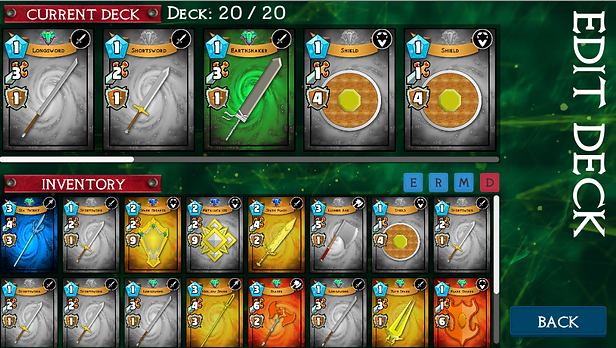
Edit Deck mode allows the player to see their gorgeous collection of cards
the current deck shows the cards that will be utilized in combat.
Game Guide
At all times the current deck should have 20 cards assigned. no more no less.
Tap a card in the inventory to add cards to the deck.
Tap a card in current deck to remove cards from the deck.
Perform a long press on a card to view the card details in detail.
cards can be sorted in the inventory by pressing on the following buttons:
Pressing the “E” button sorts the cards based on their Element.
Pressing the “R” button sorts the cards based on their Rarity.
Pressing the “M” button sorts the cards based on their Mana Cost.
Pressing the “D” buttons allows the player to delete unwanted cards from the inventory
bottom of page